Install ClarityRead
Add the extension to Chrome so one-click reader mode, contrast, typography, and read-aloud controls are always within reach.
 ClarityRead
Reading Mode & Dyslexia Support
ClarityRead
Reading Mode & Dyslexia Support
Immediate clutter relief · Dyslexia-friendly controls · Private by default
ClarityRead gives students, researchers, and everyday readers a premium reading workspace for cluttered articles, homework resources, documentation, and long web pages. Clean the page, tune the typography, boost contrast, and listen along—with page processing designed to happen locally in your browser by default.
Simple setup
Install once, then turn difficult pages into readable ones whenever clutter, small text, or fatigue gets in the way.
Add the extension to Chrome so one-click reader mode, contrast, typography, and read-aloud controls are always within reach.
Visit an article, lesson, documentation page, or long-form resource with sidebars, ads, tiny fonts, or dense paragraphs.
Click once to strip away clutter, adjust the text, boost contrast, or listen while you follow along.
Built for real reading needs
ClarityRead turns common reading pain points into quick, practical fixes, with privacy-first defaults that match the privacy policy.
Remove visual noise from busy pages so your attention stays on the article, lesson, or documentation you came to read.
Switch to dyslexia-friendly typography, larger sizing, and comfortable spacing when tiny fonts or dense paragraphs slow you down.
Reader tools are designed to work locally in your browser, with no page-content collection or remote transfer by default.
Use high contrast or read-aloud support through your browser's speech synthesis when eye strain makes reading difficult.
A calmer reading workflow
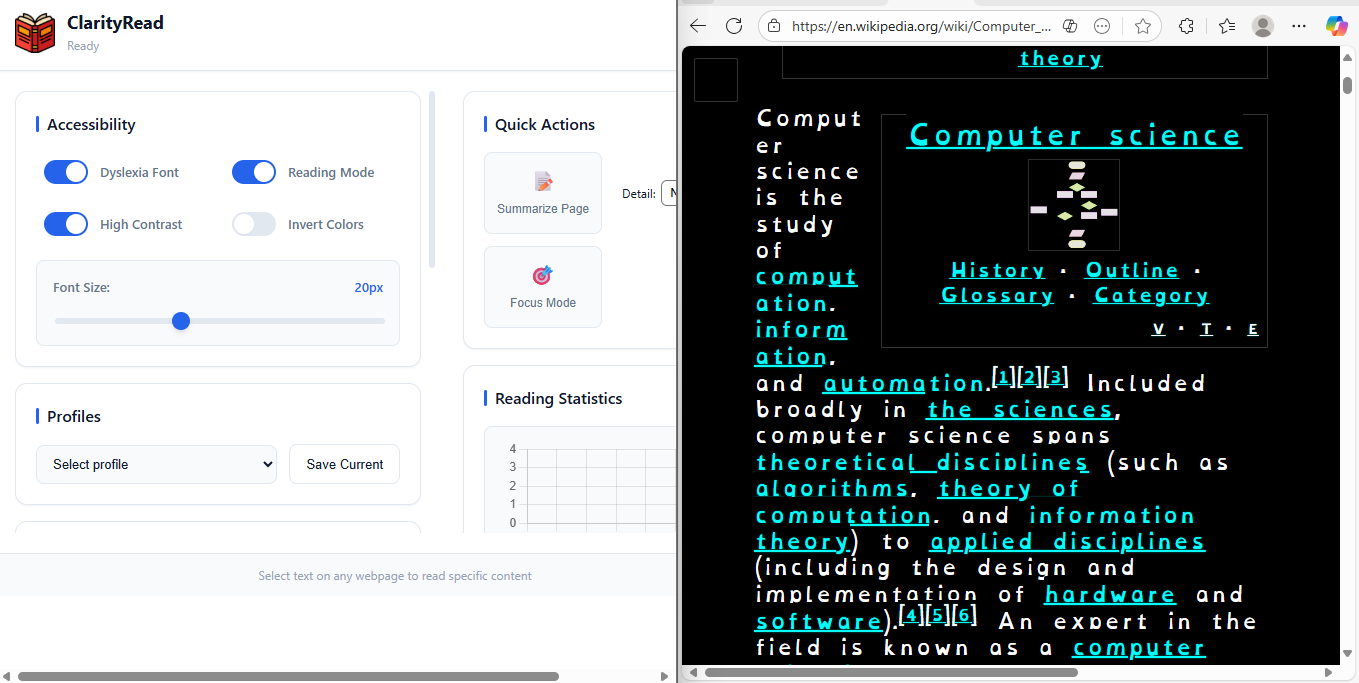
ClarityRead is designed to feel like a polished reading command center: fast controls, clear visual states, and small comfort features that make difficult pages feel less demanding.
Before
After ClarityRead
Privacy you can understand
ClarityRead is built around browser-based reading tools. By default, page content and selections are processed locally for reader mode, visual adjustments, summarization, and read-aloud controls instead of being collected or sent to remote servers.
Ready for easier reading?
Add ClarityRead to Chrome for a cleaner way to read articles, homework resources, research tabs, and dense web pages. Use dyslexia-friendly controls, adjust contrast and spacing, and keep page content local by default.
Switch to an OpenDyslexic-style font with spacing controls that help letters and lines feel easier to follow.
Turn cluttered, long-form pages into a focused reading column with adjustable font sizes and line height.
Listen to selected text or full pages with browser speech synthesis when eye strain or lost focus makes reading harder.
Boost contrast or invert colors to reduce squinting and make hard-to-see pages more comfortable.
See it in action
This short demo shows how the extension helps you simplify page layouts, adjust reading comfort, and keep focus on the content that matters.